
Unlock Bios Password LENOVO THİNKPAD T460

Vahab Hemmati

Support Team
Staff member
Admin
Registered

Reputation:

"Instructions for use"

Remove all battery and CMOS battery

press F1 to enter setup: password 1234
wait 20sec or more.
Enter any ID to hardware Id.
Press 2x space bar when asked.
Turn off the computer.
and restore your original bios .

Enjoy.

If 2x 5beep, it's normal.
I didn't do checksum but it must light up anyway.
Wait minimum 30sec before screen logo light on. Must turn on/off several times by itself.


vitalgon1

Registered
Bronze

reputation_scoree

Hi,

Should my original file be modified?

With yours, I can't get past the Lenovo logo.

Here's my file.

Please help me bypass the password. My son forgot it.
Thx
 

Attachments

  • ORI_v.3_ORANGE_25Q128FVSQ_W25Q128FV@SOIC8_gesperrt.bin
    16 MB · Views: 0

vitalgon1

Registered
Bronze

reputation_scoree

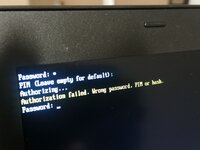
I managed to get the BIOS password working.

Now I've run into another problem password. Can anyone help me?

Is it the hard drive password?
 

Attachments

  • IMG_20260323_041958.jpg
    IMG_20260323_041958.jpg
    2.8 MB · Views: 2

rezatel

BEYHAN
Registered
Premium Silver

reputation_scoree

Hello, is this your motherboard model?
BT462 NM-A581
After removing the password, reprogram your original file.
 

rezatel

BEYHAN
Registered
Premium Silver

reputation_scoree

After deleting the password with this file given to you, you must reprogram your original file.
 
Who is viewing this thread?

There are currently 0 members watching this topic

Top